
The Ultimate Facebook Ads Guide (2026)
If you’re looking to attract customers, generate leads, or increase online sales, Facebook Ads remain one of the most effective digital advertising platforms available. With billions of active users across Facebook, Instagram, Messenger, and the Audience Network, businesses of every size can reach highly targeted audiences based on demographics, interests, behaviors, and purchase intent. This guide covers everything you need to know about Facebook Ads—from understanding how the platform works and choosing the right campaign objective to creating high-performing ads, tracking conversions, optimizing results, and avoiding common mistakes. Whether you’re running your first campaign or looking to improve your return on ad spend (ROAS), you’ll find practical strategies and actionable insights throughout this guide.
What Are Facebook Ads?
You’re scrolling through your feed, catching up on family updates and dog videos, when you see a post from a brand you’ve never heard of. Somehow, it’s selling the exact ergonomic chair you were just complaining you needed. That’s not a coincidence. That’s a Facebook Ad. Unlike Google Ads, where you capture people actively searching for a specific term, Facebook Ads let you find people based on who they are, what they like, and how they behave online. It’s outbound marketing powered by one of the most sophisticated algorithms on the planet. If you want to put your product directly in front of the people most likely to buy it, this is how you do it.
How the Ad Machine Actually Works in Facebook Advertising
At its core, a Facebook Ad is paid content that blends seamlessly into a user’s natural browsing experience. You bid in a real-time auction for space in the News Feed, Stories, Messenger, or the right-hand column.
But the real magic isn’t the placement—it’s the targeting. Meta (Facebook’s parent company) knows what pages you like, what posts you share, and what websites you visit. Advertisers use this data to build hyper-specific audiences. You aren’t just targeting “men in their 30s.” You can target “men in their 30s who recently bought a house, follow fitness pages, and prefer online shopping.”
The Anatomy of a Scroll-Stopping Ad
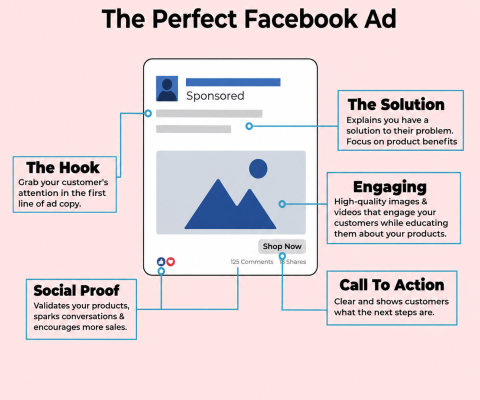
Notice how every element works together:
The Hook: Grabs attention in the first three seconds before the text gets cut off by the “See More” button.
The Creative: The image or video is the actual scroll-stopper. If the visual doesn’t catch the eye, the text never gets read.
The Solution: Focuses on the benefit to the user, not just a list of product features.
Social Proof: High engagement (likes, comments, shares) signals to the algorithm and other users that this is valuable content.
The Call to Action (CTA): Tells them exactly what to do next (e.g., “Shop Now,” “Learn More”).
To see how different formats and goals align in practice, use this sandbox to explore what type of campaign fits your specific objective:
The Reality Check: Are They Still Worth It?
If you spend five minutes on a marketing forum, you’ll find someone claiming “Facebook Ads are dead” because of privacy updates. The data tells a very different story.
| Metric | The Hard Numbers | Source |
| Active Audience | 3.96 billion monthly active users globally. | Meta Q3 2023 Earnings |
| Conversion Rate | 9.21% average conversion rate across all industries. | WordStream, 2023 |
| Market Share | Over 70% of all social media ad spend. | Statista, 2023 |
| Average ROI | $2.50 to $3.50 return for every $1 spent in e-commerce. | Shopify Commerce, 2023 |
3 Practical Tips for Winning the Auction
Throwing money at the platform won’t guarantee sales. If you want to protect your budget and actually get a return, stick to these rules:
1. Sell the Hole, Not the Drill Stop listing features. Your audience doesn’t care that your software has a “256-bit encrypted dashboard.” They care that they can “leave work at 5 PM without worrying about a data breach.” Focus entirely on the transformation your product provides.
2. Feed the Algorithm Broad Data Years ago, advertisers would create hundreds of hyper-niche audiences. Today, the machine learning is smarter than we are. Give the algorithm a broad audience (e.g., “US, Women, 25-45”) and let your ad creative do the heavy lifting. The people who stop to watch your video are the ones the algorithm will actively find more of.
3. Test One Variable at a Time When an ad fails, people tend to change the image, the headline, and the audience all at once. If it suddenly works, you have no idea why it worked. Test your main image first. Once you find a winner, test two different headlines. Keep it scientific.
Why Businesses Use Facebook Ads
You have a brilliant product. Your website is flawless. Now, all you need are customers. If you wait for them to stumble across your page organically, you might be waiting years. If you want them today, you buy their attention.
That is the core reason over 10 million active advertisers pour billions into Meta (Facebook and Instagram) ads every month. Unlike search ads that wait for a user to type a specific query, Facebook ads let you proactively put your brand in front of users based on their behavior, interests, and past purchases. It’s an engine designed to generate demand out of thin air.
Despite claims that organic reach is the only way forward, the numbers from recent 2025 and 2026 data tell a different story about paid social. Businesses keep spending here because the platform consistently delivers volume at scale.
| Metric | The Reality | Source |
| Monthly Reach | Facebook categorizes and targets over 3.07 billion active users globally. | Meta Q4 2025 Earnings |
| B2B Trust | 70% of marketing leaders report Facebook has the strongest business impact among social platforms. | Sprout Social, 2026 |
| Conversion Efficiency | The average conversion rate across all industries sits at 7.72% for lead campaigns. | Triple Whale Benchmarks, 2025 |
| Ad Dominance | Meta accounts for over 68% of total e-commerce ad budgets. | Triple Whale, 2026 |
Hyper-Targeting in Action
Businesses don’t use Facebook ads just for vanity metrics; they use them because the machine learning algorithms actually work. However, performance varies heavily based on what you are selling and how much friction is in your buying process.
Consider the Pets & Animals sector. Emotional purchases thrive on visual platforms. A brand selling custom dog collars doesn’t just target “dog owners.” They target users who recently watched dog training videos and regularly buy premium pet food online. Because the barrier to entry is low, the pet industry saw a solid 1.58 Return on Ad Spend (ROAS) in 2025.
On the other hand, a local Real Estate agency uses the platform strictly for high-ticket lead generation. While their Cost Per Click (CPC) might be higher (averaging $0.91), their ultimate ROI often exceeds a 4:1 ratio. They don’t need thousands of clicks; they just need one highly qualified lead to convert into a massive commission.
To see how these variables actually affect your bottom line, use this sandbox to model how slight improvements in your ad performance compound your revenue:
3 Practical Tips for Winning the Auction
The auction is crowded. Simply throwing money at Facebook won’t guarantee a return. Protect your budget with these non-negotiables:
Feed the AI Broad Data: The days of manually hyper-targeting small, niche audiences are over. Meta’s Advantage+ and AI bidding algorithms are smarter than we are. Give the system a broader audience constraint (e.g., “US, Women, 25-50”) and let your creative do the filtering. The people who stop to watch your video tell the algorithm exactly who to find next.
Optimize for the First 3 Seconds: If your video doesn’t hook the viewer immediately, they will scroll past. The silent autoplay feature means your visual needs to do the heavy lifting instantly. Research shows that making your brand or product visible in the first two seconds can drive significantly higher ROI.
Keep Your Post-Click Experience Seamless: A high click-through rate means nothing if your landing page takes five seconds to load. Ensure the headline on your landing page perfectly matches the promise made in your ad so users don’t bounce.
Facebook Ads vs Google Ads
You have $5,000 to spend on marketing this month. You need revenue, not just “brand awareness” or likes. The debate always comes down to the two heavyweights: Google Ads and Facebook (Meta) Ads.
If you spend any time in marketing forums, you will see people fiercely defending one platform over the other. The truth is, framing them as competitors is a fundamental mistake. They do entirely different jobs. The smartest businesses in 2026 aren’t choosing between them—they are using both to build a bulletproof sales machine
The Core Difference: Intent vs. Discovery
Understanding these platforms requires a single mental model: Google captures demand that already exists. Facebook creates demand out of thin air.
If a pipe bursts in your kitchen at 2:00 AM, you don’t scroll through Instagram hoping to see an ad for a plumber. You go to Google and search “emergency plumber near me.” That is high-intent, bottom-of-the-funnel traffic. Google Ads lets you bid to show up exactly when a user is begging for a solution.
On the flip side, imagine you invented a revolutionary new posture-correcting desk chair. People aren’t searching for it because they don’t know it exists yet. If you only run Google Ads, you will hear crickets. You need to interrupt their day with a highly visual, engaging Facebook or Instagram video showing exactly how the chair fixes their back pain. That is discovery.
The Numbers (2026 Data)
Comparing the raw cost per click (CPC) between the two platforms is highly misleading, but understanding the baselines helps you plan. Notice how Google costs significantly more per click, but converts at a much higher rate because of the built-in search intent.
| Metric | Google Ads (Search) | Facebook Ads |
| Average CPC | $2.69 – $5.26 | $0.70 – $1.83 |
| Average Conversion Rate | 7.04% | 1.50% – 3.00% |
| User Intent | High (Ready to buy) | Low (Browsing/Passive) |
| Primary Strength | Capturing active buyers | Visual storytelling & scale |
Data sourced from WordStream and Meta’s 2025/2026 industry benchmarks.
Key insight: A $3.00 click on Google might actually be cheaper than a $1.00 click on Facebook if the Google user buys your product five times more often. Always judge by the Cost Per Acquisition (CPA), never the Cost Per Click.
3 Practical Tips for Maximum Returns
1. Run the Smart Funnel Approach
Don’t pick sides. Run Facebook video ads to a broad audience to introduce your brand (top of funnel). Then, run Google Search ads to capture those same people when they remember your brand three days later and search for it (bottom of funnel).
2. Guard Your Google Budget with Negative Keywords
Google will happily spend your money showing your ad to unqualified people. If you sell enterprise software, add terms like “free,” “cheap,” and “student” to your negative keyword list immediately. You only want clicks from people ready to pay.
3. Let Meta’s AI Do the Heavy Lifting
Years ago, marketers would spend hours building highly specific audiences on Facebook (e.g., “Men, 34-45, who like golf and drive Audis”). In 2026, Meta’s Advantage+ algorithm is smarter than you are. Give it a broad audience, give it excellent video creative, and let the AI find your buyers.
Understanding Facebook Ads Manager
Logging into Facebook Ads Manager for the first time feels like sitting in the cockpit of a commercial jet. There are endless toggles, drop-downs, and metrics blinking at you. It’s an incredibly powerful platform, but without a map, it’s just overwhelming.
The secret to mastering this tool isn’t memorizing every single button. It’s understanding the architecture. Once you grasp how Meta organizes your advertising account, the chaos turns into a predictable, logical system.
The 3-Tier Architecture
Every single ad you see on Facebook or Instagram is built on a strict three-level hierarchy. Think of it like a Russian nesting doll.
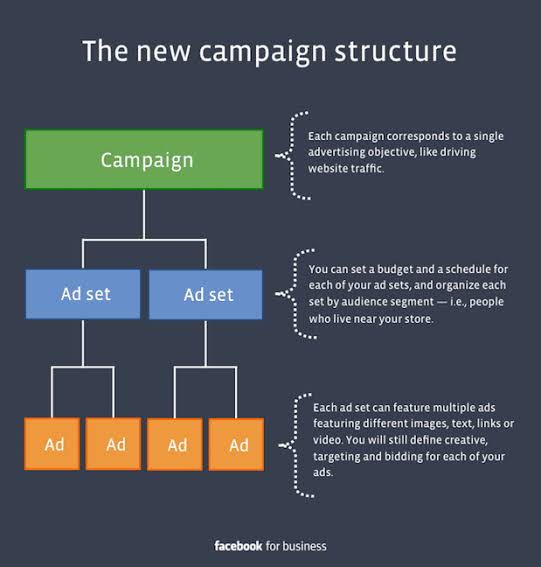
The Meta Ads 3-Tier Structure. Source: AdEspresso
1. The Campaign Level (The “What”)
This is the foundation. Here, you make one critical decision: your objective. Do you want brand awareness, website traffic, leads, or sales? If you choose “Sales,” Meta’s algorithm will aggressively look for buyers. If you choose “Traffic,” it will find clickers. You cannot optimize for both in the same campaign.
2. The Ad Set Level (The “Who” & “Where”)
Inside your campaign, you create Ad Sets. This is where you define your audience, your budget, your schedule, and your placements (like choosing between Instagram Reels or the Facebook Feed).
3. The Ad Level (The “How”)
Inside each Ad Set live your actual Ads. This is the creative layer—the images, videos, headlines, and “Shop Now” buttons that users actually interact with on their screens.
A Real-World Example:
Imagine you own a local coffee shop.
Campaign: Your objective is Sales.
Ad Set 1: Targets local espresso lovers within 10 miles.
Ad Set 2: Targets your past website visitors (retargeting).
Ads: Three different videos of a latte pour running simultaneously in both Ad Sets.
The 2026 Reality: Advantage+ and AI
If you read an Ads Manager guide from three years ago, it will tell you to obsessively layer manual interests like “People who like Starbucks AND Yoga.” Ignore that advice.
In 2026, Meta’s ecosystem is heavily driven by its AI-powered Advantage+ suite. The platform actively discourages heavy manual targeting restrictions. Today, the smartest advertisers set a broad audience constraint (like “US, Ages 25-50”) and let the algorithm do the heavy lifting. The AI uses the engagement on your creative to figure out exactly who the buyers are.
3 Practical Tips for Your First Campaign
1. Keep it Simple (The Consolidated Account)
Don’t build 15 different campaigns. A modern, efficient Ads Manager account rarely needs more than two or three core campaigns (e.g., one for prospecting new customers, one for retargeting). Mixing too many variables dilutes your budget and confuses the algorithm.
2. Name Everything Logically
A campaign named “Test 1 Final v2” tells you nothing. Use a strict naming convention like [Objective] - [Audience] - [Date]. Example: Sales-Broad US-May 2026. When you are analyzing a dashboard with dozens of rows, this habit will save your sanity.
3. Don’t Touch It Too Early
When you launch a new ad set, it enters a “Learning Phase” where costs will temporarily spike and be volatile. Meta needs about 50 conversion events to stabilize. If you panic and change the budget or the image on day two, you reset that learning phase back to zero. Patience pays off.
Campaign Objectives Explained
When you click the green “Create” button in Meta Ads Manager, you are immediately forced to make the most critical decision of your entire campaign: picking an objective.
If you get this wrong, your creative doesn’t matter. Your budget doesn’t matter. The Meta algorithm is incredibly literal. It will do exactly what you tell it to do, even if that’s not what you actually meant it to do. If you tell it you want traffic, it will find people who love clicking links—but who almost never buy anything.
Meta recently consolidated its old, messy list of 11 objectives into six streamlined, outcome-driven goals (ODAX). Let’s break down exactly what they mean and when you should actually use them.
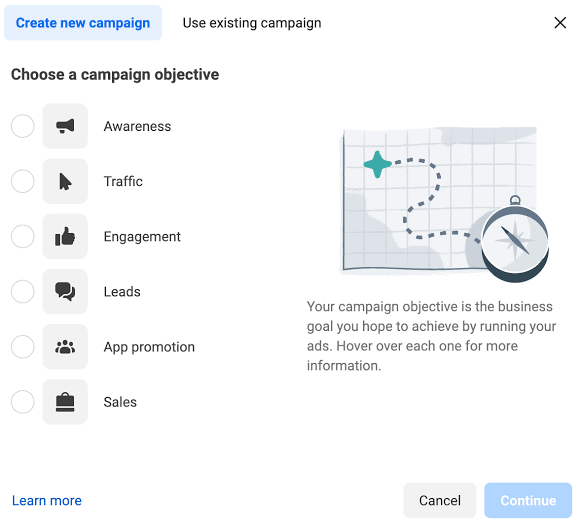
The 6 Core Meta Ad Objectives. Source: Social Media Examiner
The 6 Objectives Unpacked
| Objective | What it tells the Algorithm | Best for |
| Awareness | “Show this to as many people as possible for the lowest cost.” | Big brands wanting mass reach; local businesses doing a grand opening. |
| Traffic | “Find people who have a history of clicking links and leaving Facebook.” | Sending readers to a blog post or podcast episode. (Terrible for sales.) |
| Engagement | “Find people who like, comment, share, or watch videos all the way through.” | Building a retargeting audience based on video views, or boosting page likes. |
| Leads | “Find people willing to hand over their name, email, or phone number.” | B2B companies, real estate agents, or offering a free PDF download. |
| App Promotion | “Find people likely to download and open a new app.” | Mobile games or SaaS apps wanting installs. |
| Sales | “Find people with a history of pulling out their credit card and buying.” | E-commerce stores, high-ticket coaching, or direct product sales. |
The most common mistake beginners make is choosing “Traffic” when they really want “Sales.” They assume, If I get cheap traffic to my site, eventually they will buy. The data completely shatters that logic.
According to 2025 benchmarks from Triple Whale, Traffic campaigns often have a Cost Per Click (CPC) under $0.50, but their conversion rate sits near a dismal 0.1%. Meanwhile, Sales campaigns might cost $1.50 per click, but they convert at 2-5%. The algorithm knows who the window shoppers are and who the actual buyers are. Don’t pay for window shoppers.
3 Practical Tips for Setting Your Objective
1. You Can’t Cheat the System If you want sales, pick Sales. If you want leads, pick Leads. Trying to use a cheap Traffic objective to generate sales is like hiring a professional clown and hoping they know how to do your accounting. The algorithm only optimizes for the specific action you tell it to track.
2. Use Engagement to Build “Invisible” Audiences If you have a brand new ad account with zero data, start with an Engagement campaign using a high-quality video. The cost per view will be pennies. You can then tell Meta to create a “Custom Audience” of everyone who watched 50% or more of that video. You now have a warm list of interested people to target with a Sales campaign later.
3. Ensure Your Pixel is Firing If you choose Leads or Sales, Meta relies on the Pixel (a piece of code on your website) to know if a conversion actually happened. If your Pixel is broken, the algorithm flies blind and will waste your budget. Always use the Meta Pixel Helper Chrome extension to verify your tracking before launching a conversion-based objective.
Audience Targeting
You just spent $1,000 on an incredibly produced, high-definition video ad for your premium leather boots. The copy is sharp. The call-to-action is clear. But when you check the dashboard three days later, you’ve generated zero sales. Why? Because the platform showed your ad to teenagers who only buy sneakers and vegans who don’t wear leather.
That is what bad audience targeting looks like. You can have the best bait in the world, but if you drop your line in a swimming pool, you aren’t going to catch any fish.
In the Meta Ads ecosystem (Facebook and Instagram), targeting used to be a game of manual guesswork. You would sit at your computer and stack interests like “People who like hiking AND premium coffee AND drive SUVs.” In 2026, that manual approach is largely obsolete. Today, the smartest advertisers rely on three distinct pillars of targeting, leaning heavily into machine learning to find the buyers hiding in the crowd.
The Three Pillars of Meta Audiences
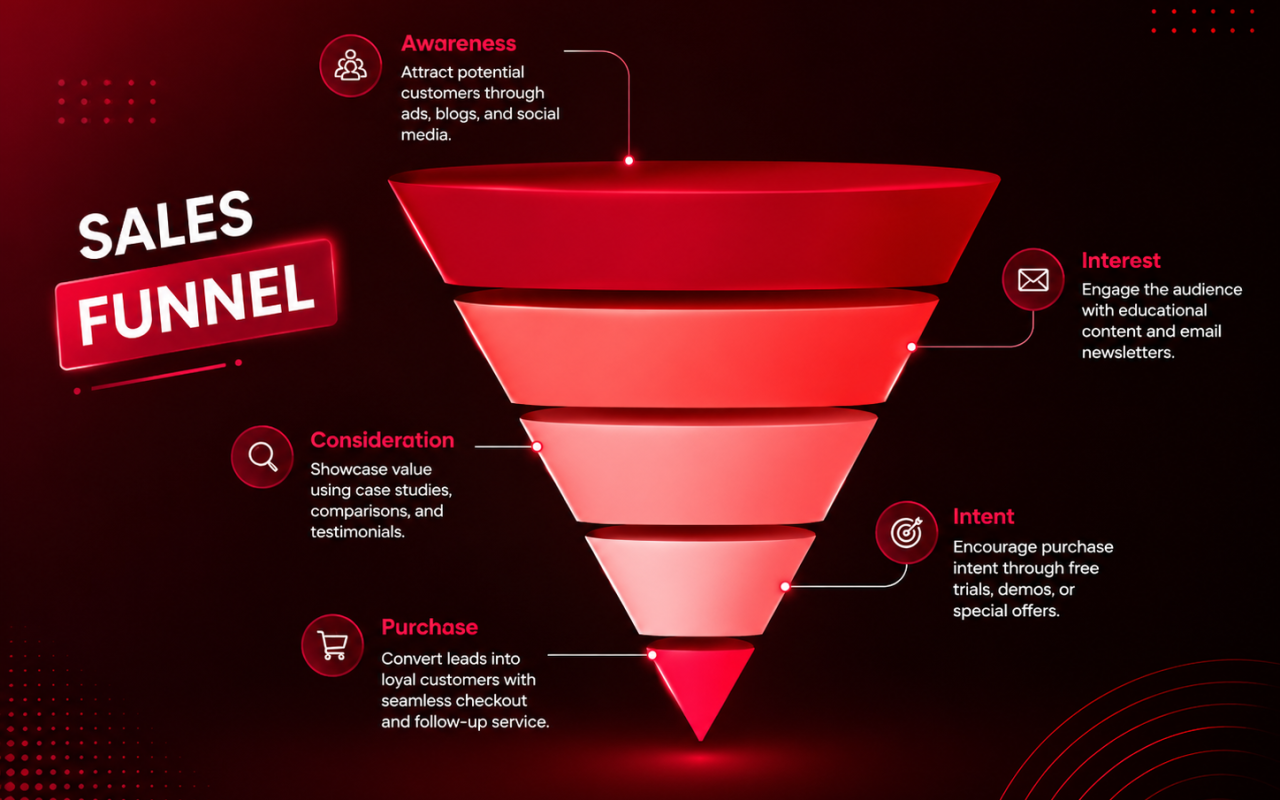
Think of audience targeting as a funnel. At the top, you have people who have never heard of you. At the bottom, you have people practically begging you to take their credit card.
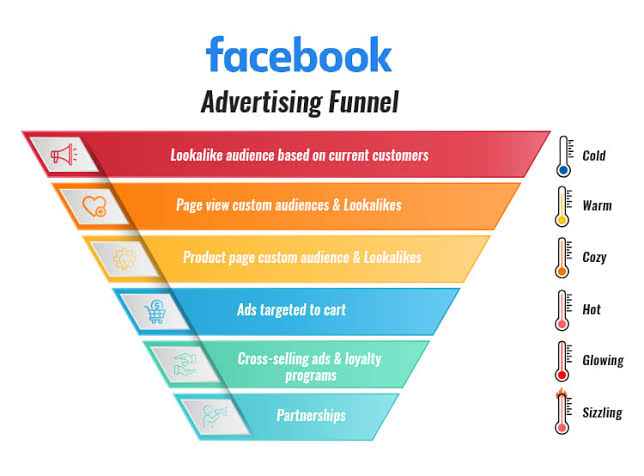
Mapping Audiences to the Advertising Funnel. Source: ClickFunnels
1. Core Audiences (The Broad Approach)
This is where most beginners start. You define the audience by geography, age, gender, and broad interests. However, modern best practice dictates keeping this as broad as possible. Why? Meta’s Advantage+ algorithm is now so advanced that it uses your ad creative (the image or video) as the actual targeting tool. If you post a video about a heavy-duty pickup truck part, the algorithm quickly realizes that 18-year-old college students scroll past it, while 45-year-old tradesmen stop to watch. It self-corrects in real-time.
2. Custom Audiences (The Warm Leads)
These are people who already know who you are. This is the highest-converting traffic you will ever buy. You upload a list of your past customers, or tell Meta to target anyone who has visited your website in the last 30 days, watched at least 50% of your video, or added an item to their cart but didn’t buy.
Real Example: An independent bookstore runs a broad Core Audience ad showing a viral video of their cozy reading nooks. They then create a Custom Audience of everyone who watched at least 15 seconds of that video. A few days later, those specific people get a new ad offering 15% off their first online book order. That is how you turn a stranger into a customer.
3. Lookalike Audiences (The Scale Engine)
If you have a list of 1,000 past buyers, Meta can analyze those specific people, identify the thousands of hidden data points they share (from the pages they follow to the time of day they shop), and go find 2 million other people who look exactly like them. It is the most powerful scaling tool in modern advertising.
The Data: Why We Let the Algorithm Drive
If you are still manually picking 30 different interests for your ad sets, you are fighting the machine. According to 2026 performance data compiled by major media buying agencies like Triple Whale and Northbeam, broad targeting consistently outperforms micro-targeting over time.
| Metric | Broad/Advantage+ Targeting | Manual Interest Targeting |
| Average Cost Per Acquisition (CPA) | 18% Lower | Baseline |
| Ad Fatigue (Time to Burnout) | 4-6 Weeks | 1-2 Weeks |
| Algorithm Learning Speed | Fast (Larger data pool) | Slow (Restricted data pool) |
| Best Used For | Finding new customers at scale | Highly niche, local restrictions |
Data reflects 2026 aggregated e-commerce benchmarks.
3 Practical Tips for Targeting Today
1. Exclude Your Past Buyers If your goal is to acquire new customers, you are wasting money if you accidentally show your ads to people who bought from you yesterday. Always create a Custom Audience of “Purchasers in the last 60 days” and explicitly exclude them from your prospecting campaigns.
2. Stop Overlapping Your Lookalikes Many beginners will put a 1% Purchasers Lookalike in one ad set, and a 1% Website Visitors Lookalike in another. Because people who purchase also visit the website, you are essentially bidding against yourself in the auction. Consolidate them into one ad set.
3. Use Video to Filter the Crowd When you use a broad audience (like all of the US, ages 25-55), your video needs to act as a bouncer at a club. Call out your target audience in the first three seconds: “If you are a freelance designer tired of chasing invoices…” Anyone who isn’t a freelance designer will scroll past. The algorithm notes who stopped, and goes to find more of them.
Budget & Bidding
You can have the perfect ad creative, the exact right audience, and a flawless landing page. But if your bidding strategy is wrong, you will burn through your budget in a matter of hours with absolutely nothing to show for it.
Every time a user opens Facebook or Instagram, an invisible, split-second auction takes place. Meta has to decide whose ad to show that specific user. Your budget determines how much fuel you have, but your bidding strategy determines exactly how the algorithm spends that fuel.
Let’s break down the mechanics of how to actually control your costs in the 2026 Meta Ads ecosystem.
The 4 Core Bidding Strategies
In the past, advertisers micromanaged every penny. Today, Meta’s AI does most of the heavy lifting, but you still have to give it the right instructions. Choosing your bid strategy is how you tell the algorithm what you value more: sheer volume, or strict profitability
| Bidding Strategy | What it tells the Algorithm | When to use it |
| Highest Volume (Lowest Cost) | “Spend my entire daily budget and get me as many results as possible, regardless of the cost.” | Your default starting point. Best for new campaigns to gather data quickly and exit the learning phase. |
| Cost Cap | “Try to keep my average cost per result at or below this target amount.” | You know your break-even number and want to maintain profitability while scaling up your budget. |
| Bid Cap | “Never bid more than this exact amount in any single auction.” | Highly competitive industries (finance, SaaS) where you need strict margin control. |
| Minimum ROAS | “Only spend money if you predict the return will hit this multiplier (e.g., 2.5x).” | E-commerce brands with strong pixel data optimizing purely for revenue. |
A Real-World Shift: A direct-to-consumer (D2C) clothing brand spending $10,000 a month was stuck using the default “Highest Volume” bidding. They were getting plenty of sales, but their Cost Per Acquisition (CPA) fluctuated wildly—$15 one day, $45 the next. In early 2026, they switched their core campaigns to Minimum ROAS bidding, setting a strict target of 3x. Within 45 days, their overall ROAS increased by 68%, and they saw 3.2x more purchases from high-value customers. They bought fewer total clicks, but the clicks they did buy were vastly more profitable.
The Math Behind the Auction
The highest bidder does not automatically win. If Meta just gave the ad space to whoever paid the most, users would be spammed with terrible, irrelevant ads and leave the platform.
Instead, Meta determines the winner based on Total Value:
Total Value = Your Bid Amount + Estimated Action Rate + Ad Quality
If your ad is highly engaging and users naturally stop to watch your video (high Ad Quality), you can actually beat a massive competitor who is bidding three times as much as you.
3 Practical Tips for Managing Your Spend
1. Respect the 20% Scaling Rule: If a campaign is highly profitable at $50 a day, your first instinct is to immediately bump the budget to $500. Don’t. A massive budget jump throws the algorithm back into the “Learning Phase” and destabilizes your results. Scale your winning campaigns by increasing the daily budget by no more than 20% every 48 to 72 hours.
2. Don’t Starve the Algorithm: Cost Caps are incredible tools, but beginners often set them unrealistically low. If your historical CPA is $30, and you set a Cost Cap at $10 hoping for a miracle, Meta will simply stop spending your budget. It knows it cannot win auctions at that price. Always set your initial Cost Cap 10-15% higher than your actual goal to give the AI breathing room to learn.
3. Account for Seasonal CPM Spikes: Ad space is a supply-and-demand market. During Q4 (Black Friday through Christmas), massive retailers flood the auction. Industry data shows average Cost Per Mille (CPMs—the cost for 1,000 impressions) spikes by roughly 60% during these peak periods. You must increase your bids and budgets during holidays just to maintain your normal traffic volume.
Ad Formats
You’ve got a brilliant product, a sharp audience, and the right budget. But if your ad format doesn’t fit the screen or the user’s mindset, they will scroll right past it.
In 2026, Meta’s ecosystem (Facebook, Instagram, and Threads) is entirely visually driven. Picking the right format is about matching the creative layout to how your customer actually uses their phone.
While Meta offers over 25 different placements, four core formats drive the vast majority of performance:
1. Single Image Ads: The fastest to produce. Perfect for quick promotions or striking visuals.
2. Video & Reels Ads: The undisputed kings of attention. Reels ads use a full-screen vertical ratio and seamlessly blend into the organic feed.
3. Carousel Ads: A swipeable series of 2 to 10 cards. They work beautifully for telling a sequential story or showcasing different angles of a single product.
4. Collection Ads: A mobile-only, mini-storefront experience. They feature a hero video on top with four product images below.
Real Example: An independent fitness apparel brand stopped running basic image ads and switched to a Collection Ad. The hero video showed a high-energy workout, while the four images below linked directly to the specific leggings, sports bra, and shoes worn in the video. By reducing the friction between seeing the outfit and buying it, they tripled their daily sales volume.
3 Practical Tips for Flawless Formatting
1. Own the Screen Space
Stop using 1:1 square images for everything. For Facebook and Instagram feeds, use a 4:5 vertical ratio (1080 x 1350 px). It takes up 25% more physical space on a mobile screen than a square image, forcing users to look at it longer.
2. Respect the 9:16 Safe Zones
When shooting full-screen video for Reels or Stories, keep your text and logos out of the top and bottom 15% of the screen. If you put text there, the platform’s user interface (like the “Share” and “Like” buttons) will cover it up.
3. Let the Format Match the Goal
Selling a $10 t-shirt? A quick Carousel or Image ad works fine. Selling a complex $500 software subscription? You need a 60-second Video ad to explain the value proposition before asking for the click.
Creating Your First Campaign
Hitting the green “Publish” button on your very first Facebook Ad Campaign is a defining moment for any business. You are handing your budget over to an algorithm, crossing your fingers, and hoping those Facebook ads bring back actual paying customers.
But if you have ever logged into Facebook Ads Manager, you know it feels less like a marketing tool and more like the cockpit of a commercial jet. There are endless toggles, hidden menus, and warnings blinking at you.
Building a profitable Facebook Ad Campaign doesn’t require a master’s degree in data science. It requires a fundamental understanding of how the machine thinks. Let’s break down exactly how to launch your first set of Facebook ads without burning through your cash.
The 3-Step Architecture of a Facebook Ad Campaign
Every single Facebook Ad Campaign is built on a strict, three-level hierarchy within Facebook Ads Manager.
1. The Campaign Level: Choosing Your Objective
This is where you tell Facebook Ads Manager what a “win” looks like. Do you want brand awareness, website traffic, leads, or sales?
Real Example: Imagine you run a local roofing company. If you select the “Traffic” objective for your Facebook Ad Campaign, the platform will show your Facebook ads to people who love clicking links. They will click, look around, and leave. But if you select the “Leads” objective, Facebook Ads Manager will aggressively target users whose past behavior shows they actually fill out contact forms. Always choose the exact outcome you want.
2. The Ad Set Level: Targeting and Budget
This is the engine room of your Facebook Ad Campaign. Here, you define your daily budget, your geographic targeting, and your audience.
In the past, running Facebook ads meant stacking dozens of highly specific interests. Today, the smartest advertisers rely on Meta’s Advantage+ targeting. You simply give Facebook Ads Manager a broad parameter (e.g., “Homeowners in Texas, ages 30-65”) and let the algorithm find the buyers.
3. The Ad Level: The Creative
This is the actual image, video, and text that users see in their feed. Your Facebook ads are the only part of this process your customer actually interacts with. If your video is boring, the best targeting in Facebook Ads Manager won’t save you.
When you launch your first Facebook Ad Campaign, you need to know what normal performance looks like. If you blindly trust the default settings in Facebook Ads Manager, you might panic when you see your first bill. Based on aggregated 2026 data from Triple Whale and WordStream, here is how Facebook ads perform on average:
| Metric | 2026 Industry Average | What It Means For Your Facebook Ads |
| Average Cost Per Click (CPC) | $0.70 – $0.78 | What you pay every time someone clicks your ad. |
| Average E-commerce CVR | 1.57% – 1.60% | The percentage of clickers who actually buy your product. |
| Average Lead Gen CVR | 7.72% – 8.25% | The percentage of clickers who fill out a lead form. |
| Average Cost Per Action (CPA) | $38.19 | The total amount you spend on Facebook ads to acquire one customer. |
Sources: Triple Whale Meta Ads Benchmarks 2026, WordStream 2026 Report.
3 Practical Tips for Your First Facebook Ad Campaign
1. Consolidate Your Budget The biggest mistake beginners make in Facebook Ads Manager is creating 10 different ad sets with $5 a day each. The algorithm needs data to learn. If you spread your budget too thin, your Facebook Ad Campaign will never exit the learning phase. Put your entire budget into one or two ad sets to feed the machine faster.
2. Test the Hook, Not Just the Audience When Facebook ads fail, people immediately blame the audience targeting in Facebook Ads Manager. Ninety percent of the time, the audience is fine; the ad creative is just boring. Test three completely different videos (or image headlines) in your first Facebook Ad Campaign to see what makes people stop scrolling.
3. Optimize for the Click, Sell on the Site The job of your Facebook ads is not to sell the product. The job of the ad is to sell the click. The job of your landing page is to sell the product. Keep your ad copy focused on curiosity and the core problem you solve.
Meta Pixel & Conversion Tracking
You just launched a brilliant campaign inside Facebook Ads manager. You check your Facebook ads cost daily. You see clicks, but zero sales. You are officially flying blind in the world of Facebook advertising.
This happens when you run campaigns without the Meta Pixel. The Pixel is the bridge between your website and Facebook Ads manager. Without it, the algorithm has no idea what happens after someone clicks your ad, which guarantees your Facebook ads cost will skyrocket. If you are serious about Facebook advertising, installing the Pixel (and the Conversions API) is strictly non-negotiable.
How the Pixel Controls Your Facebook Ads Cost
The Meta Pixel is a snippet of code sitting on your website. When a user clicks an ad and buys a product, the Pixel fires a signal back to Facebook Ads manager. Facebook Ads manager then analyzes that buyer’s profile and adjusts your Facebook advertising targeting to find similar buyers. This machine learning loop is the only way to lower your Facebook ads cost over time.
Real Example: The Blind E-Commerce Store
Imagine an online coffee brand spending $1,000 on Facebook advertising. Without the Pixel, Facebook Ads manager reports 500 clicks, giving a $2.00 Facebook ads cost per click. But did anyone buy? The brand has no idea.
Now, they install the Pixel. The next $1,000 in Facebook advertising generates 50 purchases. Facebook Ads manager instantly calculates a $20 Facebook ads cost per acquisition (CPA). More importantly, Facebook Ads manager now knows the exact demographic of those 50 buyers, making the next round of Facebook advertising significantly cheaper.
The Hard Data on Tracking
Apple’s iOS privacy updates severely disrupted Facebook advertising tracking. However, according to Meta’s 2025 internal performance benchmarks, advertisers who combine the Meta Pixel with the Conversions API (CAPI) see an average 13% reduction in their Facebook ads cost per acquisition. Providing Facebook Ads manager with redundant server-side data is exactly how you survive and scale in modern Facebook advertising.
3 Practical Tips for Facebook Ads Manager
- Install the Conversions API: The browser Pixel is no longer enough to keep your Facebook ads cost down. You must send server-side data directly to Facebook Ads manager to track users utilizing aggressive ad-blockers.
- Map Out Custom Events: Don’t just track purchases. Tell Facebook Ads manager when someone adds to cart or initiates checkout. This gives your Facebook advertising campaigns more data points, allowing the algorithm to optimize your Facebook ads cost much faster.
- Use the Test Events Tool: Before spending real money on Facebook advertising, open Facebook Ads manager and use the Test Events tool to verify your Pixel is firing correctly. A broken Pixel guarantees a wasted Facebook ads cost budget.
Optimization Techniques
The old playbook for Facebook advertising is officially broken. If you are still building 20 different ad sets, stacking micro-interests like “People who like coffee AND yoga,” and micromanaging daily budgets, you are fighting the machine. In 2026, optimization isn’t about pulling levers in the dark; it’s about feeding Meta’s AI the right data.
The biggest shift separating elite media buyers from everyone else is account consolidation. You need to simplify the architecture inside your Facebook Ads manager.
In the past, advertisers built highly complex trees of campaigns and ad sets to test every possible demographic variable. Today, that complexity destroys your Return on Ad Spend (ROAS).
Let’s look at the numbers. The Meta algorithm is incredibly smart—it predicts conversion likelihood with 87% accuracy (Meta Q4 2025 Data). But it operates on a hard mathematical rule: an ad set needs 50 conversions in a 7-day window to exit the “learning phase” and stabilize performance.
If your budget is spread across 15 different ad sets, none of them will hit that 50-conversion threshold. Your ads will remain volatile, unpredictable, and expensive.
Average Facebook ads cost is rising, making efficiency mandatory. Visible Factors reports 2026 median CPMs (cost per 1,000 impressions) hovering between $6.96 and $13.48 depending on your industry. You simply cannot afford to waste expensive impressions on a fragmented account structure.
Real-World Example:
A 2026 case study by Greenwill Techs highlighted an e-commerce brand that moved from a scattered 20-ad-set structure to just 3 consolidated Advantage+ Shopping campaigns. By combining their data into fewer buckets, their Cost Per Acquisition (CPA) dropped from $42 to $28 (a 33% improvement), and overall ROAS jumped from 2.8x to 4.6x.
3 Practical Optimization Tips for 2026
1. Let Creative Do the Targeting
If you are trying to scale your Facebook advertising today, stop obsessing over demographic settings. The creative is the targeting. A video showing a stressed mom packing a lunchbox will naturally attract parents. A video showing a bodybuilder prepping meals will attract fitness enthusiasts. Run different creative angles to a broad audience, and let the algorithm find the buyers based on who stops scrolling.
2. Test Angles, Not Button Colors
Dynamic Creative Optimization (DCO) is your best friend. Don’t waste your testing budget swapping a red “Shop Now” button for a blue one. Test completely different psychological hooks: a social proof angle (customer testimonials), a problem-agitation angle, and a pure product demonstration.
3. Set Strategic Bid Caps
To control your Facebook ads cost while scaling, graduate from the default “Lowest Cost” bidding. If you know your exact break-even point, switch to Cost Cap or Minimum ROAS bidding. Set your cap 10-15% higher than your actual target to give the algorithm breathing room to enter competitive auctions without choking off your traffic.
Common Facebook Ads Mistakes
You launch a campaign, check your dashboard three days later, and realize you’ve burned through $500 with zero sales to show for it. If you’ve spent any time doing Facebook advertising, you know the sinking feeling of a campaign that just won’t convert. The problem usually isn’t the platform; it’s how you’ve instructed the algorithm.
Let’s look at the most expensive mistakes businesses make when buying Meta ads in 2026, starting with the foundation.
1. Picking the Wrong Campaign Objective
The algorithm does exactly what you tell it to do. If you want people to buy your $50 water bottle but you choose the “Traffic” objective, Meta will find people who love clicking links. They will click your ad, look at your landing page, and bounce. You get cheap clicks, but zero revenue.According to 2026 benchmarking data from Triple Whale, Traffic campaigns often boast a Cost Per Click (CPC) under $0.60, but their conversion rate sits near a dismal 0.1%. Meanwhile, Sales campaigns might cost $2.00 per click, but they convert at 2-5%. If you want sales, explicitly choose the “Sales” objective in your Facebook Ads manager.
2. Audience Overlap (Bidding Against Yourself)
Beginners love creating multiple ad sets to test every possible demographic. Ad Set A targets “Fitness Enthusiasts,” and Ad Set B targets “People who like Gymshark.”
Because millions of people fall into both categories, your two ad sets end up entering the exact same auction. You are literally bidding against yourself, artificially driving up your own Facebook ads cost.
Real Example: A custom apparel brand was spending $200 a day across five highly segmented lookalike audiences. When they ran Meta’s Audience Overlap tool, they realized 60% of their audiences were identical. By consolidating those five ad sets into one broad Advantage+ campaign, their Cost Per Acquisition (CPA) dropped by 28% overnight.
3. Suffocating the Learning Phase
Meta’s machine learning needs data to stabilize. Specifically, an ad set needs roughly 50 conversion events within a 7-day window to exit the “Learning Phase.”
When you launch a campaign, performance will fluctuate wildly for the first few days. If you panic on day two and change your image, adjust your budget, or tweak the audience, you force the algorithm to start over. Constantly touching your campaigns guarantees they never optimize and your costs stay high.
3 Practical Tips to Stop Wasting Budget
1. Let Creative Do the Heavy Lifting Stop obsessing over manual interest targeting. Give the system a broad audience constraint (e.g., “US, Ages 25-50”) and let your video creative filter the crowd. A video speaking directly to “exhausted freelancers” will naturally attract that exact demographic. The people who stop to watch are the ones the algorithm will actively find more of.
2. Exclude Past Purchasers Unless you sell a consumable product people buy weekly, exclude anyone who purchased from you in the last 60 days from your prospecting campaigns. Stop paying to acquire customers you already own.
3. Verify Your Tracking A broken tracking setup means the algorithm is flying blind. Always use the Meta Pixel Helper Chrome extension to verify your site is actually sending purchase data back to the platform. If Meta doesn’t know who bought your product, it can’t find similar buyers.